Home BETTING TOOLKIT USER GUIDE Automation Conditions Goal Scored Condition
Goal Scored Condition
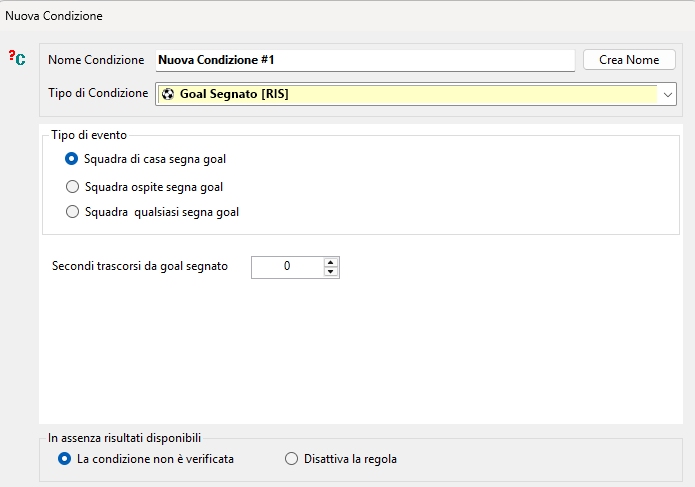
Updated on 2026-09-15This Condition allows you to trigger a Rule when a team has just scored a goal.
You can specify which team should be monitored, or specify that the Condition should be met when either team scores.
You can also set a minimum delay, in seconds, after the goal is scored.
When the Goal Scored Condition is evaluated during a strategy execution cycle—even if it is evaluated at multiple points in the Conditions tree or in multiple different Rules—the “Goal Scored” state is reset and remains cleared until another goal is scored. This ensures that the Condition evaluates as true only once for each goal, even when the Rule execution frequency is high compared with the frequency at which the score changes.
For this Condition to work, results for the event must be available. See the important warning regarding Live Results settings.
If results are not available, the Condition can either return false or disable the Rule. This can be useful when the strategy assumes that results are available and should not proceed if they are not.