Home BETTING TOOLKIT USER GUIDE Functions Bets Status
Bets Status
Updated on 2026-09-20The Bets Status function consists of two tabs: the first tab, Closed Bets, provides a detailed report of all bets that have been placed and closed, while the second tab, Open Bets, shows a list of bets for which the outcome is not yet defined because the market is still open.
The Closed Bets table, depending on the selected option, displays the total number of closed bets for the day, the previous day, the last 7 days, and the last 90 days. It provides the total number of matched and closed bets for the chosen time period, along with their total return expressed in euros (or your currency).
In the Open Bets table, the following columns are available:
- Bet ID
- Bet type (EXC = LIMIT, SP | LOC = Starting Price Limit On Close, SP | MOC = Starting Price Market On Close)
- Creation date and time
- Event name
- Market name
- Selection name
- Bet side (Back or Lay)
- Bet persistence
- Requested odds
- Stake
- Bet status (Matched, Unmatched, Partially Matched)
- Matched stake
- Matched odds
- Match date and time
- Remaining stake (unmatched)
- Bet reference (for bets placed by a strategy, this is the strategy name; otherwise, it is the name that may have been specified in the Trading Options)
- The button used to cancel the unmatched portion of the bet, if the bet has not yet been fully matched
In the Closed Bets table, the following columns are available:
- Bet ID
- Bet type (EXC = LIMIT, SP | LOC = Starting Price Limit On Close, SP | MOC = Starting Price Market On Close)
- Creation date and time
- Event name
- Market name
- Selection name
- Bet side (Back or Lay)
- Bet persistence
- Requested odds
- Stake
- Matched odds
- Match date and time, including hours, minutes, and seconds
- Outcome (Winner or Loser)
- Gross profit or loss. Note that the profit is shown as gross because it refers to an individual bet. The market's net profit or loss is calculated by adding together the gross profits/losses of all bets in the market and then applying commission if the overall result is positive. Therefore, a net value for an individual bet would not be meaningful.
- The bet settlement date. This is the date on which the market is settled and all bets placed are processed by Betfair to determine the net result to be applied to the user’s account balance.
- The bet reference (for bets placed by a Strategy, this is the name of the specific Rule containing the bet placement Action; for manual bets, it is the name optionally set in Trading Options).
- Whether the odds have been reduced or not. If so, the corresponding odds have been affected by a Reduction Factor due to a participant being withdrawn from the market (horse racing).
You can generate a chart showing financial performance based on the Closed Bets table. You can open as many chart windows as you like, but only one for each analysis performed.
Using the Bets Status window to evaluate a Strategy
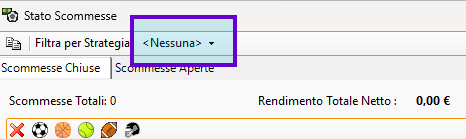
The Bets Status window is particularly useful for strategy management because it allows you to filter reports—both Open Bets and Closed Bets—based on the Strategy that generated the bets.
By selecting a Strategy in the filter, you can obtain a detailed report showing the performance of that Strategy.
Using the Bets Window in Simulation Mode
When used in Simulation Mode, the Bets Window has some limitations regarding the Closed Bets table, as described below.
- The Closed Bets table does not have a date filter. Instead, all bets from markets closed during the simulation session are displayed.
- Settled bets (i.e. bets that have resulted in a win or loss) are recorded when the market is closed. In Simulation Mode, for this to occur, the market must be active, meaning that it must be open in a Market Window or present in the Markets Monitor. If the market is not active in the program, the bet result will not be recorded and the closed bet will not appear in the list.
- In the case of a Placed Market, any reduction factors affecting the calculation of winnings are not taken into account. Therefore, the calculated P/L values may differ from those that would have been obtained if the bets had been real.
It is also important to note when bet data is cleared in Simulation Mode:
- Closed Bets: data is cleared whenever the trading session is closed (logout).
- Open Bets: data is cleared whenever Simulation Mode is disabled.
