Home BETTING TOOLKIT USER GUIDE Betting Toolkit Automation Applying Strategy to the Market
Applying Strategy to the Market
Updated on 2026-09-05Once a strategy has been created using the Strategy Manager, it must be applied to a market and launched.
A strategy can be applied to a market in several ways:
- from the Market Window Toolbar, using the menus available next to the Strategy Slot buttons.

- from the Apply Strategy to Market Window, accessed by clicking one of the slot buttons described above.
- from the Predefined Strategy buttons available on the Market Window toolbar.

- from the Market Window's Grid and Ladder trading interfaces, and from the Market Board's simplified grid control, using the Apply Strategy Control.
- from the Apply Strategy menu in the Market Monitor Window, which allows strategies to be applied in bulk to multiple markets.
Predefined Strategies
If predefined strategies have been defined, they can be launched with a single click on the corresponding button in the Market Window toolbar.

Strategies for Selections
If the strategy requires a selection to be launched, it is applied via the Strategy Application Control in the trading interfaces (Ladder and Grid) and the Markets Board grids, and the strategy icon is marked with the letter "S."
If the strategy requires a selection to be launched, it is applied via the Strategy Application Control in the trading interfaces (Ladder and Grid) and the Markets Board grids, and the strategy icon is marked with the letter "S."
In this case, the strategy cannot be applied at the market level, so it will not be available as a button in the Market Window toolbar and will not appear in the strategy application menus in the Market Window and Market Monitor.
In this example, you can see how predefined strategy number 4 is a selection strategy:
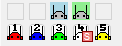
A strategy can be launched from a selection if one or more of its conditions or actions refers to the Default Strategy Application Selection selection. In this case, the Strategy Manager indicates this characteristic with an "S." For a selection strategy to be available in the trading menus, it must be associated with one of the 5 predefined strategies (colored robots).
Limits on strategies applicable to a market
Five strategy application slots are available for each market.
Multiple instances of a selection strategy can be launched simultaneously on a market, applying them from different selections, while respecting the limit of five strategies per market.
A non-selection strategy can only be applied to one slot. If you attempt to apply the same strategy to a second slot, you will receive an error message.
A non-selection strategy can only be applied to one slot. If you attempt to apply the same strategy to a second slot, you will receive an error message.
